Recommended PTT accessories
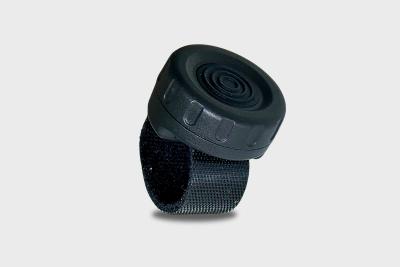
Bluetooth PTT button SKU 509
Pair a IP67 certified Bluetooth Push to Talk button with your smartphone. Keep your smartphone in your pocket, plug in your earphones, and talk to your team in GroupTalk with a simple press on the button. No charging, battery replacement every 6-12 months.
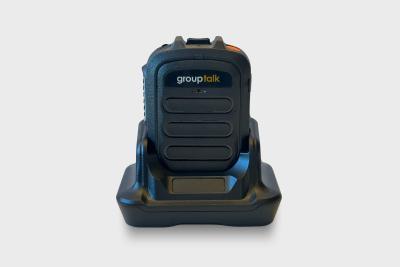
Bluetooth RSM SKU 580 with charger SKU 581
Pair a traditional Remote Speaker Microphone (RSM) with your smartphone. It has buttons for Push to Talk (PTT), Personal Alarm and Function button that can be mapped to Repeat last message, Queue, Silent mode or any other feature that you prefer.
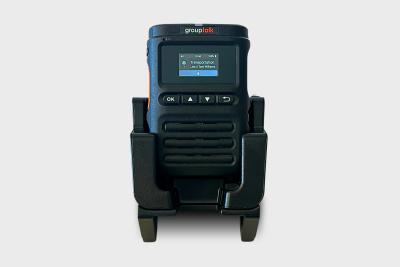
PoC radio GT15 SKU 150 with charger SKU 151
The GT15 is a dedicated 4G radio that gives you direct access to the most used GroupTalk features – with physical buttons for: Push to Talk, panic alarm, queue (call request), repeat last message, channel selection, volume control.
Push-to-Talk buttons
Bluetooth PTT button SKU 509
Pair a IP67 certified Bluetooth Push to Talk button with your smartphone. Keep your smartphone in your pocket, plug in your earphones, and talk to your team in GroupTalk with a simple press on the button. No charging, battery replacement every 6-12 months.
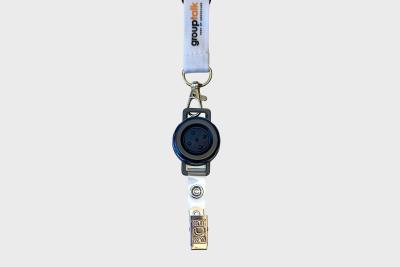
Lanyard PTT button SKU 529
This Bluetooth button comes on a lanyard for your ID or access card, keeping GroupTalk always within reach. Use the button for Push-to-Talk (PTT) or as a personal alarm button, depending on your needs. Speak directly with colleagues or send an alert whenever the situation requires it. No charging, battery replacement every 6-12 months.
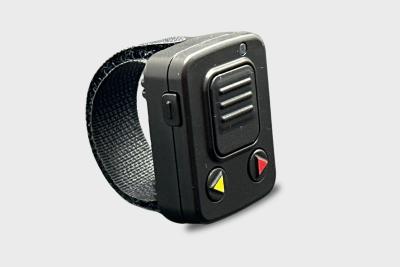
Bluetooth multi PTT button SKU 508
With a Bluetooth multi PTT button, you can keep your smartphone in your pocket, plug in your earphones and use the bluetooth button for PTT, personal alarm and function button that can be mapped to repeat last message, queue, silent mode or any other feature that you prefer. No charging, battery replacement every 6-12 months.
Remote Speaker Microphones (RSM)
Bluetooth RSM SKU 580 with charger SKU 581
Pair a traditional Remote Speaker Microphone (RSM) with your smartphone. It has buttons for Push to Talk (PTT), Personal Alarm and Function button that can be mapped to Repeat last message, Queue, Silent mode or any other feature that you prefer.
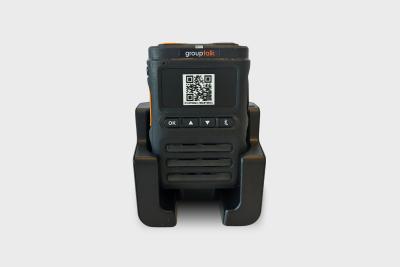
Bluetooth RSM QR SKU 550 with charger SKU 551
Unlock seamless Push to Talk and personal alarm with our RSM (Remote Speaker Microphone) and QR code Bluetooth pairing. To simplify and enhance the pairing process, we at GroupTalk have developed a feature in the GroupTalk app that allows you and your colleagues to use QR codes to pair Bluetooth PTT accessories.
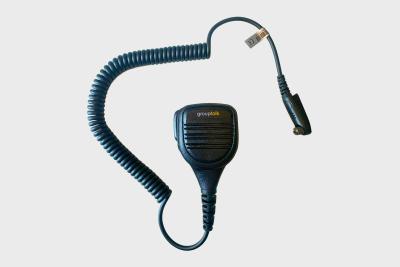
Wired RSM SKU 180
Wired RSM with M6 connector with PTT button for GroupTalk radio GT25.
Push-to-Talk headsets
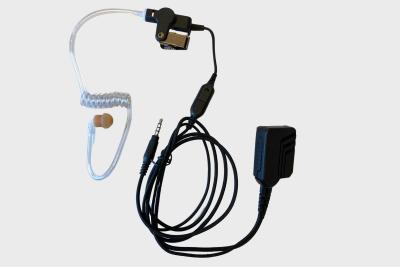
PTT headset SKU 510+515
One-wire SNAP headset with 3,5 mm jack connector. It has a bluetooth PTT button and a dedicated media button for phone calls. The earpiece has a SNAP connector which allows easy exchange of different types of earpieces, acoustic, C-ring, G-hook, etc. depending on your work environment.
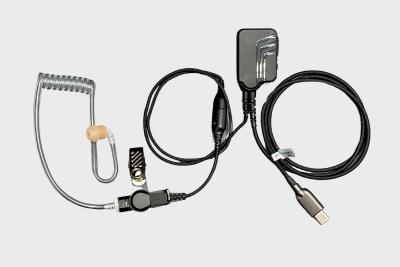
PTT headset Android SKU 530 iPhone SKU 532
This headset is plug and play, just connect it to the USB-C / lightning port of your smartphone and the PTT button is ready to use. The earpiece has a SNAP connector which allows easy exchange of different types of earpieces, acoustic, C-ring, G-hook, etc. depending on your work environment. SKU 530 for Android, SKU 532 for iPhone (models before iPhone 16).
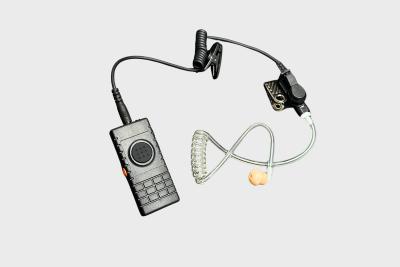
Bluetooth PTT headset with mic SKU 565 & 718
Easy-to-use and discreet headset with Push to Talk and phone function buttons. Compatible with Android and iOS, featuring a 3.5mm jack for easy connectivity. Charging with micro USB.
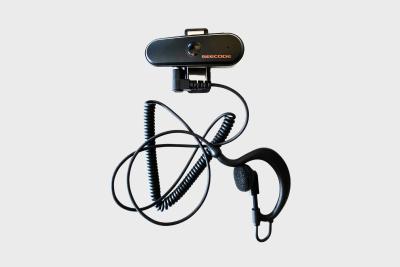
Bluetooth PTT headset with mic SKU 546
Easy-to-use and discreet Bluetooth headset with PTT & media button, G-type headset included. Compatible with Android and iOS, featuring a 3.5 mm jack for easy connectivity. Charging with USB.
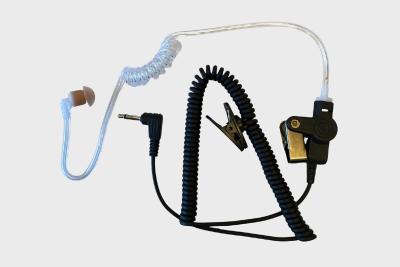
Acoustic listen only headset SKU 708
Connect a listen only headset with 3,5 mm jack with black spiral cable L-connector to your PoC radio. One of the most popular products.
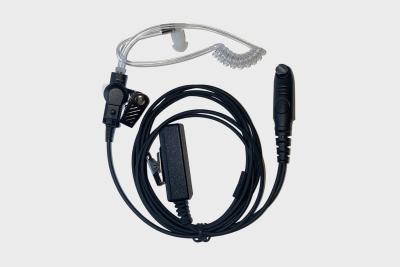
Push-to-Talk headset M6 connector SKU 181
Acoustic headset with PTT button for GroupTalk radio GT25.
Push-to-Talk radios
GT15 radio SKU 150 with charger SKU 151
The GT15 is a dedicated 4G radio that gives you direct access to the most used GroupTalk features – with physical buttons for: Push to Talk, panic alarm, queue (call request), repeat last message, channel selection, volume control.
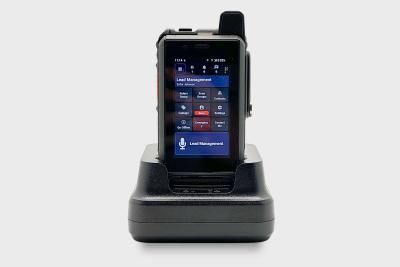
GT25 radio SKU 250 with charger SKU 251
GT25 uses the 4G network for communication and is a dedicated Push to Talk device with buttons for personal alarm, queue (call request from alarm / control center), channel selection and volume buttons. The radio is based on Android and is handled largely in the same way as a smartphone.
PC Dispatch accessories
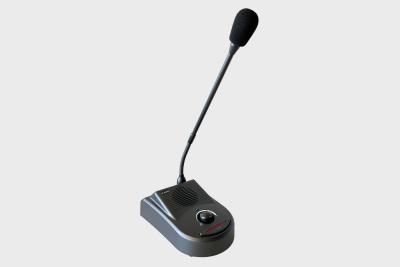
Desktop microphone with PTT button SKU 714
GroupTalk PC Dispatch users can benefit from a desktop microphone with built in speaker and dedicated PTT button, volume control, connector for headset. The mic connects to the PC via USB.
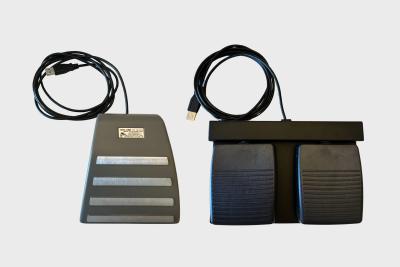
Foot pedal for Push to Talk SKU 731 & 732
Some users are very busy using their hands on the PCs keyboard and mouse, working in different applications and can benefit from controlling the PTT using a single or double foot pedal that connects to the PC via USB.
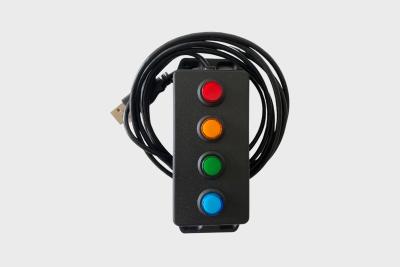
USB PTT button SKU 715, 723, 724 & 725
Models with 1, 2, 3 or 4 buttons available for efficient communication in multiple PTT groups. The PTT button connects to the PC via USB.
Vehicle radios
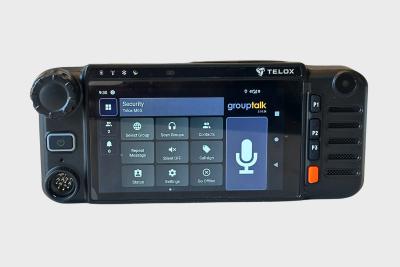
GT62 vehicle radio GT62 SKU 818
GT62 uses the 4G network for PTT communication with dedicated panic alarm button and programmable buttons. This is an Android based device for use in vehicles (or on the desk at the office), comes with RSM, mounting bracket and power cable (requires DC 12-24V).
Radio bridge
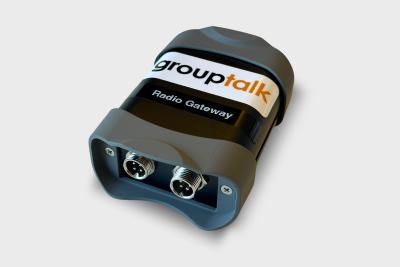
GroupTalk radio gateway SKU 950
The GroupTalk radio gateway enables customers using Push to Talk (PTT) with two-way radios to easily connect them with GroupTalk on Android/iOS smartphones or PC Dispatch. It uses the Android device’s 4G/5G connection and is powered via USB-C, while the radio’s own battery makes the setup fully portable — ideal for temporary projects.
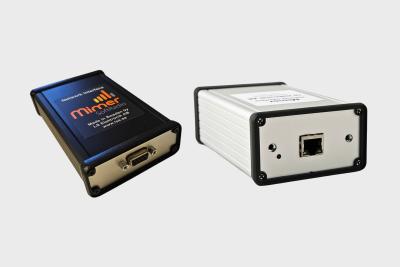
Generic radio connection SKU 901 & 902
Some customers need to continue using their Tetra, UHF, VHF, DMR radio systems. From a practical and economic perspective it can be wise to look into deploying a radio bridge. This provides a cost effective solution that combines the existing two way radios with smartphones and PCs, a solution without range limitations.
ATEX equipment
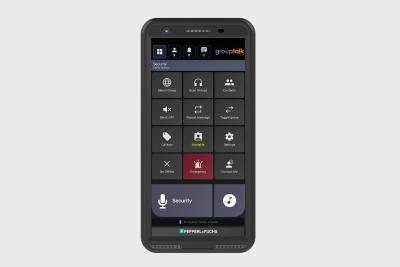
Ecom Smart-Ex 03 DZ1 & DZ2
This device is compatible with GroupTalk.
Smart-Ex 03 is Pepperl+Fuchs' most innovative smartphone, operating on networks such as 5G / 4G and WiFi. The smartphone features programmable buttons for Push to Talk, alarm, and multifunction. The multifunction button can be configured for desired GroupTalk features, such as send a Ticket to Dispatcher, Repeat Last Message, or Mute, and more.
As Smart-Ex 03 operates on both public and private 5G and 4G mobile networks, it enables efficient work, large data transfer, and minimal latency (delay) for Push to Talk calls during collaboration. Smart-Ex 03 can be used worldwide in workplaces with an increased risk of explosion within Zone 1/21 & DIV 1, Zone 2/22 & DIV 2.
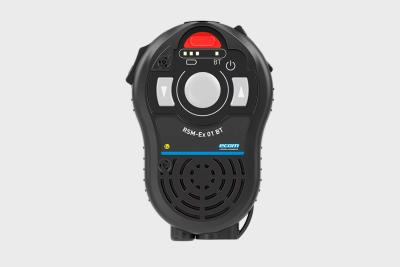
EX01/02 Bluetooth RSM with PTT & SOS button
This accessory is compatible with GroupTalk.
The RSM BT comes with an IP64 rating and a built-in noise reduction function. It is able to produce clear, high-volume audio (up to 103 dB). It has buttons for Push to Talk, panic alarm and volume control. The RSM is intuitive and easy to use, even when wearing gloves. It is intended for industrial applications and offers a rugged design. The RSM can be used worldwide in workplaces with an increased risk of explosion within Zone 1/21 & DIV 1, Zone 2/22 & DIV 2.
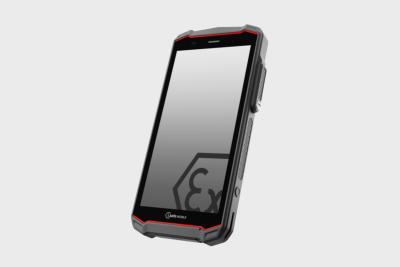
i-safe IS540 Smartphone zone 1/21
This device is compatible with GroupTalk.
IS540 gives users the opportunity to communicate in work teams, send personal alarms in case of an accident or in any other critical situation and use the camera for live video streaming. This 5G smartphone has buttons for PTT communication and panic alarm via 4G/5G or Wi-Fi in Ex-Zone 1/21. It has a 6-inch Full HD display, a powerful processor for demanding applications, a 48 MP camera, and a secure 16-pin ISM interface for approved accessories, ideally complemented by devices from the IS-RSM3x.1 series.
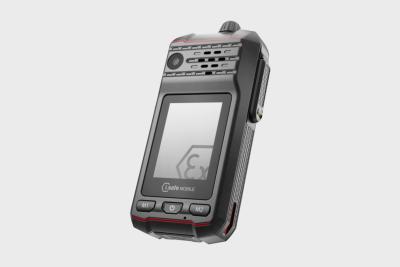
i.safe IS440 5G Radio zone 1/21
This device is compatible with GroupTalk.
IS440.1 gives users the opportunity to communicate in work teams, send personal alarms in case of an accident or in any other critical situation and use the 5G radio as a body cam for live video streaming. This 5G radio enables secure and reliable PTT communication via 4G/5G or Wi-Fi in Ex-Zone 1/21. It features a user-friendly design with large PTT and SOS buttons, a replaceable battery, a powerful front speaker, an ISM interface.
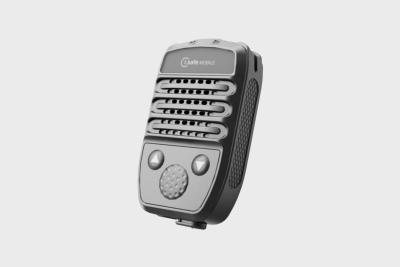
i.safe IS-RSM3A / B
This accessory is compatible with GroupTalk.
The Bluetooth Remote Speaker Microphone (RSM) is designed for PTT and personal alarm protection in Zone 1/21, featuring an ergonomic, lightweight design, powerful sound (up to 103 dB), intelligent noise cancellation. This RSM is available with either Bluetooth or a wired connection, it has a PTT and panic alarm button.
Tested phones
The list below contains phones tested by GroupTalk.
Please note that this is not a general phone test, our scope is just to verify that GroupTalk users can utilize the PTT features on the device. For more details and recommendations, please contact us at support@grouptalk.com.
Vendor | Model | PTT button |
Alarm button |
Comment |
| Bittium | Tough Mobile | Yes | No | |
| Boxchip | S700A | Yes | No | |
| Boxchip | S700B | Yes | No | |
| Cat | S41 | Yes | No | |
| Cat | S61 | Yes | No | |
| Conquest | S9 | Yes | Yes | |
| Cyrus | CS24 | Yes | No | |
| Cyrus | CS45 | Yes | No | |
| GroupTalk | GT01 (TK800/R886) | Yes | Yes | |
| GroupTalk | GT02 (TK1000/R887) | Yes | Yes | |
| GroupTalk | GT13 (T310) | Yes | Yes | |
| GroupTalk | GT22 (E980) | Yes | Yes | |
| GroupTalk | GT23 (TK1000P/R887L) | Yes | Yes | |
| GroupTalk | GT24 (E966P) | Yes | Yes | |
| GroupTalk | GT31 (E618) | |||
| GroupTalk | GT61 (E610) | Yes | Yes | |
| Hytera | PNC360 | Gui not adapted. Not recommended except for basic use in one group. | ||
| Hytera | PNC370 | Yes | No | Setup guide |
| Hytera | PNC380 | Yes | Yes | |
| Hytera | PNC550 | Yes | Yes | |
| Hytera | PDC760 | No | Yes | |
| Inrico | S100 | Yes | Yes | |
| Inrico | S200 | Yes | Yes | |
| Inrico | TM7 | No | Yes | |
| Inrico | TM7 Plus | No | Yes | |
| iSafe | IS440 | Yes | Yes | |
| iSafe | IS440.RG | Yes | Yes | |
| iSafe | IS520.1 | Yes | Yes | |
| iSafe | IS540 | Yes | Yes | |
| Keyocera | Duraforce | Yes | Yes | |
| Keyocera | Torque | Yes | Yes | |
| KT Powertel | Flip phone | Yes | Yes | |
| Motorola | Evolve | Yes | Yes | Button integration |
| RugGear | RG310 | Yes | Yes | |
| RugGear | RG360 | Yes | Yes | |
| RugGear | RG500 | Yes | No | |
| RugGear | RG530 | Yes | Yes | |
| RugGear | RG725 | Yes | Yes | |
| RugGear | RG730 | Yes | No | |
| RugGear | RG740 | Yes | No | |
| RugGear | RG745 | Yes | Yes | |
| RugGear | RG910 | Yes | Yes | |
| RugGear | RG-C1 iPhone case | Yes | No | Poor audio quality. |
| Runbo | S11 | Yes | No | |
| Runbo | K1 | Yes | No | |
| Runbo | M1 | Yes | No | |
| Samsung | XCover 3 | Yes | No | Not recommended. |
| Samsung | XCover 4 | Yes | Yes | |
| Samsung | XCover 4S | Yes | Yes | Knox configure |
| Samsung | XCover Pro | Yes | Yes | Knox configure |
| Samsung | XCover 5 | Yes | Yes | Setup guide |
| Samsung | XCover 6 Pro | Yes | Yes | Setup guide |
| Samsung | XCover 7 | Yes | Yes | Setup guide |
| Siyata | CP250 | Yes | No | |
| Siyata | UV350 | Yes | No | |
| Sonim | XP5 Plus | Yes | ||
| Sonim | XP7700 | Yes | Yes | Android 5.1.1.upgrade |
| Sure | F22 | Yes | Yes | |
| Sure | F25 | Yes | Yes | |
| TalkPod | N50 | Yes | No | |
| Telo Systems | M1 | Yes | No | |
| Telo Systems | TE390 | Yes | Yes | |
| Telo Systems | TE580 | Yes | No | |
| Telo Systems | TE590 | Yes | No | |
| Telox | TE300 | No | No | Not supported. |
| Telox | TE300K | No | No | Not supported. |
| Telox | TE320 | Yes | Yes | Use one time code for authentication. |
| Tesunho | TH580 | Yes | Yes | |
| ToughPhone | Defender | Yes | Yes | |
| ToughShield | R500 | Yes | No | |
| ToughShield | R500P | Yes | Yes | |
| Ulefone | Armor 2S | Yes | Yes | |
| Zebra | TC55 | Yes | No | |
| Zebra | TC56 | Yes | No | Configuration guide |
| Zebra | TC75 | Yes | No |