
Two way radio app with work statuses

Stay informed with GroupTalk user status

The GroupTalk user status feature helps teams stay informed and coordinated by displaying each user’s current activity or availability in real time. Whether on a mobile device or PC Dispatcher, everyone can instantly see who is available, busy, or on duty — improving communication efficiency across your organization.

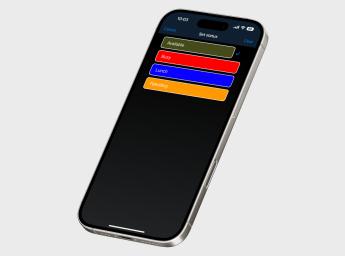
Each user can select a status from a predefined list created by the administrator in the GroupTalk web admin. The statuses can include names and colors such as “Available”, “Busy”, “On route”, “Arrived at scene”, or “Lunch”. Mobile users can easily update their own status directly in the GroupTalk app with a single tap.

Once a status is selected, it appears immediately on the user’s status button and becomes visible to all other users in the system. This ensures full transparency and allows teams to coordinate more effectively, without unnecessary Push-to-Talk calls or delays.

Two personnel working at entrance gate.

Smarter coordination with visible statuses

The user status feature is both flexible and centrally managed, meaning that administrators can configure all statuses in the GroupTalk web admin while users and PC Dispatchers can update them in real time. This makes it easy to adapt the system to your organization’s workflow and communication needs.

By knowing who is available, busy, or away, teams can respond faster and make better decisions in critical situations. For example, if a dispatcher receives a panic alarm from a user needing assistance, they can immediately see which colleagues are free to help — saving valuable time.

Similarly, when someone doesn’t answer a private Push-to-Talk call, coworkers can quickly check their User Status to see if they’re on a break or currently occupied. This reduces unnecessary interruptions, streamlines communication, and ensures smoother daily operations.